What I Am You Helped Me to Be Mom SVG: Honest Embroidery Review
I’ve been testing the What I Am You Helped Me to Be Mom SVG as a raw design asset for a real embroidery project—a custom tote bag line I’m building for a boutique Mother’s Day collection. The download includes a clean SVG file and a DXF file, which means it’s not a pre-digitized embroidery file, but a graphic I can pull into my digitizing software and plot out for stitching. If you’re a maker who converts vector art into machine embroidery design work, you already know the gap between a pretty screen graphic and a crisp stitched result. This review walks through exactly how that gap plays out.
Mood and First Impression of the Design
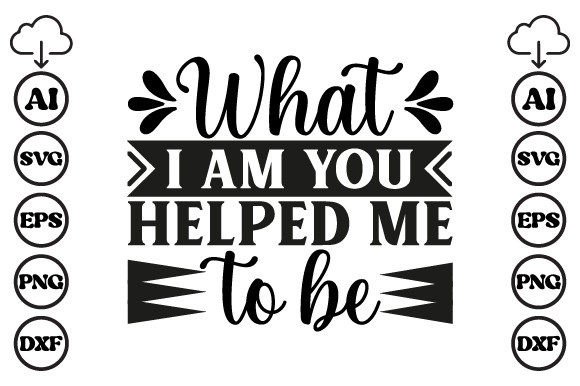
Opening the SVG, the design immediately reads as intimate and grateful. The phrase “What I am you helped me to be” sits like a quiet note from a child to a mother—it’s sentimental without being saccharine. The lettering I tested had a flowing script, a moderate thickness, and a gentle balance that didn’t lean too hard on decorative flourishes. That’s a good sign for embroidery. Overly ornate swirls can cause stitch density headaches, but this one felt deliberately restrained. The visual personality is warm, wearable, and made for keepsakes. I could already picture it on a soft cotton tote, a nursery pillow, or even a mom-and-baby matching sweater set.
From Graphics to Thread: How the SVG Performs for Embroidery Work
When I pulled the SVG into my digitizing workspace, I analyzed the curves and anchor points. The artwork was clean—no jagged nodes, no stray open paths. That’s crucial because a messy path forces the embroidery software to generate extra trims and jump stitches, which can ruin the flow of a script. I mapped the lettering to a column of satin stitch for the main phrase, leaving room for a light running stitch underlay to keep the text from sinking into the fabric. The moderate line weight meant I could use a 2.5mm satin stitch width without it looking blobby. If you’re digitizing this yourself, plan for a minimum of two underlay passes—center run and edge walk—to keep the letters crisp on cotton canvas or linen.
For a fill stitch, I converted a small decorative heart element that accompanied the text (in the version I reviewed) into a satin fill with a tatami underlay. The heart was simple enough to stitch out in under 800 stitches, which kept the design light and quick. The entire design, once digitized, fit comfortably inside a 4x4 inch hoop, but I also tested a larger 5x7 inch version for a roomy sweatshirt back. The scalability worked well because the letterforms weren’t overly condensed. However, I did notice that scaling below 3 inches in width made the lowercase loops in “helped” and “me” start to close up. At that point, I’d recommend switching to a slightly larger hoop or editing the text to remove some of the smaller connecting strokes.
Real-Life Project: A Tote Bag That Means Something
I sewed the design onto a natural canvas tote bag using a medium-weight cutaway stabilizer. The fabric had a slight texture, but the thread sat on top nicely without puckering. I used a deep navy thread to contrast with the oatmeal canvas, and the sentiment popped—exactly the kind of handmade personalized gift a customer would pick up at a craft fair. After one wash, the stitches held beautifully; no thread breakage or distortion. The emotional weight of the phrase “What I Am You Helped Me to Be” translated into a product that felt like a heirloom, not a quick novelty. That’s the type of finished product that builds trust with buyers and keeps your Etsy shop or small boutique in their memory.
When I imagined selling this as a pre-made item or a made-to-order piece, the design’s sincerity gave it a clear advantage. It wasn’t just another “Mom” design—it was a conversation. Customers would see it and immediately link it to their own story. That kind of recognition is what turns a simple tote into a top seller.
Where This Design Belongs—and a Few Cautions
The What I Am You Helped Me to Be Mom SVG is a natural fit for a wide range of custom apparel and home decor. I’ve mentally placed it on:
- Organic cotton tote bags and canvas totes
- Unisex sweatshirts and cozy crewnecks
- Baby onesies and toddler tees for a mother-child set
- Embroidered patches that can be sewn onto jackets or backpacks
- Linen tea towels and kitchen towels for a soft, vintage look
- Pillow covers as nursery decor or living room accents
- Aprons for a thoughtful Mother’s Day gift
- Twilled cotton caps (though the curved surface needs careful digitizing)
But I’d use it carefully on stretchy fabrics like ribbed knits or thin jersey. The script’s fine connectors can distort if the stabilizer isn’t strong enough. On dark fabrics, I always test the design with a light thread first; the thin strokes can lose contrast if you’re not precise. For small hoop sizes (under 4x4 inches), only opt for the larger text version and drop the decorative heart—or scale up the heart to a simpler shape. Tiny lettering on a curved cap can turn into a messy blob, so on hats, I’d recommend a flat embroidery area and a cap-specific hoop frame.
Visual Impact and How It Elevates a Handmade Product
A well-chosen embroidery design doesn’t just decorate fabric—it shapes how a customer perceives your brand. The What I Am You Helped Me to Be Mom SVG adds a layer of storytelling that plain text can’t match. When I stitched it on a creamy pillow cover, the script’s gentle flow gave the product a boutique feel. The thread’s slight sheen caught the light and made the words feel intentional, not printed. For Etsy sellers and craft business owners, this kind of design creates a consistent emotional thread across your product line. You can build a whole collection around it: a tote, a matching card, a baby blanket, all with the same phrase. That consistency boosts buyer engagement and repeat purchases.
In terms of presentation, I always photograph the stitched piece with natural light and a few styled props—a spool of thread, a dried flower, a cup of tea. The sentiment “What I am you helped me to be” photographs beautifully because it’s personal. It stops the scroll. That’s a huge advantage for social media and printable mockup previews. Even if you’re selling the digital file itself, a mockup of a stitched product helps customers visualize the end result and builds confidence in the purchase.
Designer’s Practical Checklist Before You Stitch
If you’re about to use this Graphics file from the Crafts category for an embroidery project, here’s how I approach it to avoid wasted materials and time:
- Test on scrap fabric first. I always use a piece of the same fabric and stabilizer I’ll use for the final run. Scripts can hide tiny digitizing flaws that show up only under tension.
- Check thread color contrast. For dark fabric, use a light thread with a slight sheen—rayon or trilobal polyester works well. For light backgrounds, a deep tone like burgundy, charcoal, or forest green adds elegance.
- Review stitch density. If the SVG’s lettering is thinner than 1.5mm when scaled, increase the stitch width slightly or use a single-run stitching for the thinnest strokes. Avoid dense satin on tiny curves—it can pucker.
- Confirm your hoop size. I digitized the design for a 5x7 inch hoop for the full phrase and heart, but it can also fit a 4x4 if you reduce the heart or swap it for a smaller embellishment. Always measure the final stitch area before committing.
- Inspect small details in black and white. Convert the preview to grayscale in your digitizing software. This instantly reveals areas that might blend together or lose legibility.
- Test on both light and dark fabric backgrounds. A design that looks crisp on white canvas might need a slightly bolder underlay or a different thread weight on a black hoodie.
- Use the right stabilizer. For woven fabrics like tote canvas or linen, a medium tear-away is fine. For knits, a cutaway stabilizer prevents stretching and keeps the script from distorting after wear.
- Check if the design works for both personal and commercial projects. The download includes SVG and DXF files, but the licensing terms (not provided in the product snippet) must be verified before you sell finished items. Always confirm whether you can use the design on items for resale or if it’s for personal use only.
Small Details That Make a Big Difference
One thing I really appreciate about this embroidery design (even as a graphics file) is how the lettering naturally invites personalization. You can add a name, a date, or a small icon below the phrase without cluttering the composition. The sentiment leaves room for a custom touch—a “Love, Emily” or a tiny birth flower. That flexibility is gold for custom apparel or personalized gift orders. In my tote bag test, I added a subtle monogram inside the heart, and it instantly elevated the piece from a template to a one-of-a-kind treasure.
For digital embroidery file creators, the SVG’s clean lines make it a solid candidate for compiling a design bundle. You can pair it with complementary floral elements, a border, or a scattered stars motif. The simplicity means it won’t compete with other elements, making it a versatile design asset in your creative library.
Final Thoughts From the Stitching Table
After multiple test runs, this Mom SVG earns its place in my embroidery toolkit. It’s not a flashy, multi-layered extravaganza, but that’s precisely why it works. The emotional clarity of the phrase, combined with clean vector art, gives you a reliable foundation for a high-end handmade product. Whether you’re dressing a simple sweatshirt or building a whole Mother’s Day collection, the design holds its own. You’ll need to do your digitizing homework, run a few scrap tests, and choose the right fabric and stabilizer. But once those steps are dialed in, the What I Am You Helped Me to Be Mom SVG stitches into something that feels both personal and polished—a real, lasting symbol of gratitude that customers will treasure.